Guides
Creator account storage options compared: six types
Creator account storage options compared: personal and business accounts, agency access, shared drives, asset managers and archives, and who owns each.
Creator account storage options compared here run from a personal login to a preservation archive. The six groups below name the services that do the work for a creator or an influencer agency, and the differences that decide the choice: ownership, delegated access, transfer, retention, and exit.
What to take away
- A personal account such as Google Account compared with a business account such as Google Workspace Business Standard centers one individual; the business account is meant to survive role changes.
- Agency access through Meta Business Manager or Google Ads manager account should be delegated and time-bounded, not confused with ownership.
- A shared drive such as Google Drive shared drives or SharePoint document libraries supports active team work, while an asset manager such as Bynder or Brandfolder adds structured rights and version records.
- An archive such as Preservica or Iron Mountain preserves selected records and context; it is not a working folder or backup.
- The same asset may move through several systems, but one record should identify the authoritative master.
The six options below cover personal accounts such as Google Account, Microsoft account, and Dropbox Basic. Business accounts include Google Workspace Business Standard, Microsoft 365 Business Standard, Dropbox Business, and Box Business. Agency access includes Meta Business Manager and Google Ads manager account, which delegate access without taking ownership, and Hootsuite, a scheduling tool that holds connected profiles and API tokens.
Shared drives include Google Drive shared drives, SharePoint document libraries, and Dropbox Business team folders. Asset managers include Bynder, Brandfolder, and Adobe Experience Manager Assets. Archives include Preservica, Iron Mountain, Backblaze B2, and Amazon S3 Glacier Deep Archive.
These options solve different problems. Product names and features change, so compare current terms and controls before choosing a service.
Side-by-side comparison
The table compares the six option types and names real services. It covers ownership, team access, control, transfer, security, discoverability, retention, and offboarding.
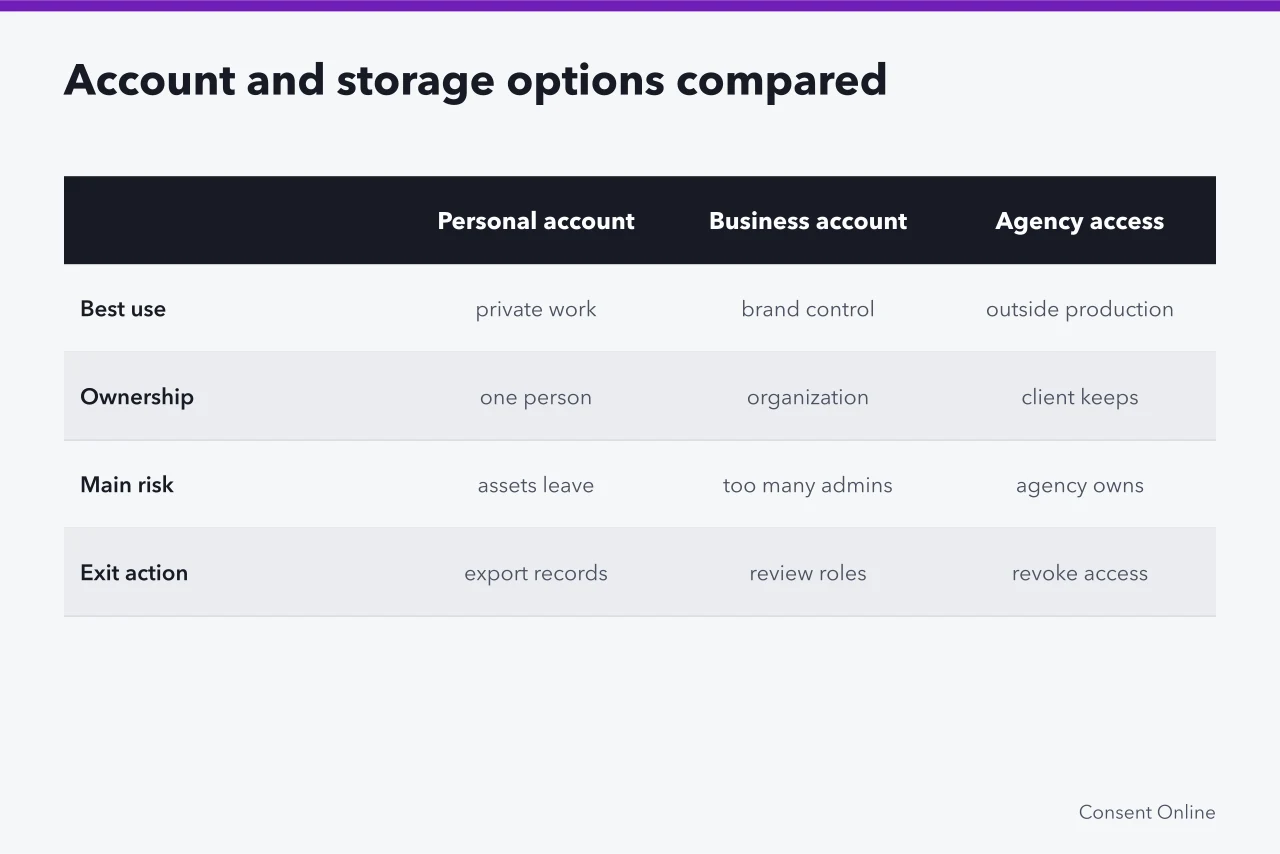
Best use
- Personal account: Google Account, Microsoft account, Dropbox Basic
- solo experiments
- Business account: Google Workspace Business Standard, Microsoft 365 Business Standard, Dropbox Business, Box Business
- durable brand control
- Agency access: Meta Business Manager, Google Ads manager account, Hootsuite
- outside production
- Shared drive: Google Drive shared drives, SharePoint document libraries, Dropbox Business team folders
- active team files
- Asset manager: Bynder, Brandfolder, Adobe Experience Manager Assets, Canto, MediaValet
- governed media library
- Archive: Preservica, Iron Mountain, Backblaze B2, Amazon S3 Glacier Deep Archive
- long-term selected records
Ownership and control
- Personal account: Google Account, Microsoft account, Dropbox Basic
- tied to one person
- Business account: Google Workspace Business Standard, Microsoft 365 Business Standard, Dropbox Business, Box Business
- organization or designated owner
- Agency access: Meta Business Manager, Google Ads manager account, Hootsuite
- client owns; agency gets role
- Shared drive: Google Drive shared drives, SharePoint document libraries, Dropbox Business team folders
- organization or team-controlled
- Asset manager: Bynder, Brandfolder, Adobe Experience Manager Assets, Canto, MediaValet
- organization with asset records
- Archive: Preservica, Iron Mountain, Backblaze B2, Amazon S3 Glacier Deep Archive
- named custodian
Team access
- Personal account: Google Account, Microsoft account, Dropbox Basic
- single login, no team roles
- Business account: Google Workspace Business Standard, Microsoft 365 Business Standard, Dropbox Business, Box Business
- admin roles and groups
- Agency access: Meta Business Manager, Google Ads manager account, Hootsuite
- partner roles, named users
- Shared drive: Google Drive shared drives, SharePoint document libraries, Dropbox Business team folders
- groups and folder permissions
- Asset manager: Bynder, Brandfolder, Adobe Experience Manager Assets, Canto, MediaValet
- permissions, portals, approval roles
- Archive: Preservica, Iron Mountain, Backblaze B2, Amazon S3 Glacier Deep Archive
- preservation roles
Transfer and exit
- Personal account: Google Account, Microsoft account, Dropbox Basic
- export or transfer authorized records
- Business account: Google Workspace Business Standard, Microsoft 365 Business Standard, Dropbox Business, Box Business
- roles, recovery, Google Takeout, eDiscovery, folder transfer
- Agency access: Meta Business Manager, Google Ads manager account, Hootsuite
- revoke role, sessions, keys, shares; export reports
- Shared drive: Google Drive shared drives, SharePoint document libraries, Dropbox Business team folders
- remove members, direct shares; transfer ownership
- Asset manager: Bynder, Brandfolder, Adobe Experience Manager Assets, Canto, MediaValet
- export masters, records, history, mappings
- Archive: Preservica, Iron Mountain, Backblaze B2, Amazon S3 Glacier Deep Archive
- verify custody, integrity, restoration
Security and discoverability
- Personal account: Google Account, Microsoft account, Dropbox Basic
- personal 2FA and recovery
- Business account: Google Workspace Business Standard, Microsoft 365 Business Standard, Dropbox Business, Box Business
- SSO, encryption, DLP, admin logs
- Agency access: Meta Business Manager, Google Ads manager account, Hootsuite
- SSO, audit logs
- Shared drive: Google Drive shared drives, SharePoint document libraries, Dropbox Business team folders
- SSO, DLP, remote wipe, share controls
- Asset manager: Bynder, Brandfolder, Adobe Experience Manager Assets, Canto, MediaValet
- SSO, watermark, rights fields
- Archive: Preservica, Iron Mountain, Backblaze B2, Amazon S3 Glacier Deep Archive
- checksums, access controls
Retention
- Personal account: Google Account, Microsoft account, Dropbox Basic
- vendor account retention
- Business account: Google Workspace Business Standard, Microsoft 365 Business Standard, Dropbox Business, Box Business
- Vault, Purview, retention labels
- Agency access: Meta Business Manager, Google Ads manager account, Hootsuite
- platform search and reports
- Shared drive: Google Drive shared drives, SharePoint document libraries, Dropbox Business team folders
- search, metadata, permission visibility
- Asset manager: Bynder, Brandfolder, Adobe Experience Manager Assets, Canto, MediaValet
- metadata search, previews, versions
- Archive: Preservica, Iron Mountain, Backblaze B2, Amazon S3 Glacier Deep Archive
- metadata search, indexes
Main risk
- Personal account: Google Account, Microsoft account, Dropbox Basic
- business assets leave with the person
- Business account: Google Workspace Business Standard, Microsoft 365 Business Standard, Dropbox Business, Box Business
- too many administrators
- Agency access: Meta Business Manager, Google Ads manager account, Hootsuite
- agency becomes de facto owner
- Shared drive: Google Drive shared drives, SharePoint document libraries, Dropbox Business team folders
- permissions become broad
- Asset manager: Bynder, Brandfolder, Adobe Experience Manager Assets, Canto, MediaValet
- bad metadata gives false confidence
- Archive: Preservica, Iron Mountain, Backblaze B2, Amazon S3 Glacier Deep Archive
- unreadable formats or missing context
Offboarding
- Personal account: Google Account, Microsoft account, Dropbox Basic
- close or transfer account
- Business account: Google Workspace Business Standard, Microsoft 365 Business Standard, Dropbox Business, Box Business
- suspend, transfer, or delete users
- Agency access: Meta Business Manager, Google Ads manager account, Hootsuite
- remove partner, rotate tokens
- Shared drive: Google Drive shared drives, SharePoint document libraries, Dropbox Business team folders
- remove members, shares, devices
- Asset manager: Bynder, Brandfolder, Adobe Experience Manager Assets, Canto, MediaValet
- revoke users, export records
- Archive: Preservica, Iron Mountain, Backblaze B2, Amazon S3 Glacier Deep Archive
- custody transfer, restore test
Personal and business accounts
Google Account, Microsoft account, and Dropbox Basic are free at entry. Dropbox Basic includes 2 GB. A personal login is convenient for a solo creator, but it binds recovery, billing, identity, and control to one person. It becomes fragile when employees, managers, heirs, or business partners need continuity.
A business account should have a documented owner, at least two controlled recovery routes where supported, named administrators, and a succession procedure.
Do not infer legal asset ownership from the username. Contracts and law may allocate copyright, confidential information, customer data, or brand assets differently from platform control.
Agency access
Meta Business Manager and Google Ads manager account are free. Meta Business Manager grants partner access to Pages, ad accounts, and pixels with roles. Google Ads manager account links client accounts without taking ownership. Hootsuite stores connected profiles and API tokens.
Influencer marketing platforms such as CreatorIQ, GRIN, Traackr, and Aspire hold creator rosters, campaign approvals, and the record of what was published, and agency access reaches into them too. A platform seat is a permission relationship like any other: named users, a review date, and a defined exit.
Agency access is a permission relationship. The client should retain the domain, tenant, billing, recovery methods, source files, and master records unless a contract says otherwise. Give the agency named user roles. Set a review date and prohibit undisclosed recovery routes.
The handoff list should cover scheduled posts, drafts, approvals, media buys, and connected apps. It also needs API tokens, analytics, invoices, local files, and outstanding disputes.
Removing an agency from one social profile does not remove its access to cloud folders or third-party scheduling tools.
Shared drives
Shared drives can reduce dependence on one worker's personal storage. Google's explanation of shared drives says their files belong to the team rather than an individual, and content remains when members leave. That is a feature of the named Google Workspace product, not a claim about every shared folder or legal ownership question.
Google Drive shared drives come with Google Workspace. SharePoint document libraries come with Microsoft 365. Dropbox Business team folders and Box Business folders give admins folder-level controls.
A shared drive is strongest when folders reflect work stages, roles are reviewed, external sharing is visible, and the authoritative master is labeled. Direct file shares can create exceptions that are easy to miss during offboarding.
Asset managers
Bynder, Brandfolder, Adobe Experience Manager Assets, Canto, and MediaValet are digital asset managers. They handle previews, metadata, versions, permissions, approval states, license dates, and distribution history at scale.
Their value depends on record design and disciplined input. A green approval badge is unreliable if it is not tied to the exact version and use.
Plan exports before buying. Confirm whether the studio can retrieve original files, custom fields, relationships, audit history, comments, derivatives, checksums, and permissions in usable formats.
Archives
Preservica, Iron Mountain, Backblaze B2, and Amazon S3 Glacier Deep Archive cover different archive jobs. Preservica handles digital preservation with metadata and checksums. Iron Mountain offers physical and digital records management. Backblaze B2 lists $6 per TB per month. Amazon S3 Glacier Deep Archive lists about $1 per TB per month.
An archive contains selected records retained with enough context to remain understandable. It may include source assets, signed documents, approval history, publication evidence, indexes, and preservation metadata. It should be access-controlled and tested, not a dumping ground for every temporary export.
The Library of Congress collection on personal digital archiving collects guidance on formats, describing digital photographs, scanning, storage media, and preservation. A commercial creator archive has additional contractual, privacy, and security needs, but the preservation lesson remains: files need selection, description, organization, copies, and continuing care.
The Internet Archive is a public nonprofit archive, not a private business archive.
Choose a combination
Many studios need a business account for control, delegated agency roles, a shared working area, an asset manager, and an archive. Write down which system is authoritative for each record type. Avoid two masters that can change independently.
A common stack is Google Workspace or Microsoft 365 for accounts, Meta Business Manager for agency access, Bynder or Brandfolder for assets, and Preservica for archive.
For an influencer or creator campaign, name the system that holds the authoritative copy of the creator contract, the usage rights, the raw footage, and the approval trail. When an agency hands a campaign back, that list is what an exit actually returns.
Common questions
Is cloud storage an archive?
Not by itself. An archive adds selection, context, integrity checks, retention decisions, controlled access, and restoration testing.
Should an agency own the brand account?
Usually the client needs durable control, but contracts and platform designs vary. Document ownership, access, recovery, and exit duties before work starts.
Can an asset manager replace releases?
No. It can store or reference them, but it does not create permission.
Is a shared drive safe for identity documents?
Only if access and security match the sensitivity. A separate restricted repository may be better.